
Change history — see what changed on an issue
Updated October 28, 2026
The History tab on an issue shows what changed, when, and who changed it — as a plain, readable log, not raw data.
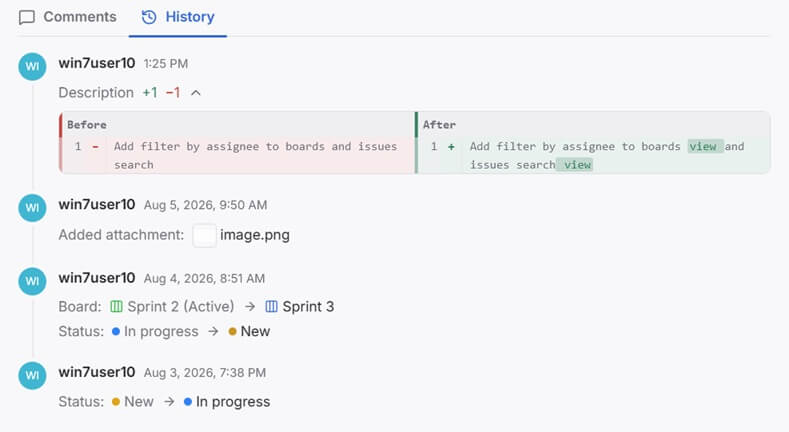
What gets logged
History tracks every kind of change an issue can go through:
- Space, epic, and status — moving an issue to a different space, board, or column
- Attributes — adding, changing, or removing a value on any custom attribute
- Title — a title being changed, shown as Title: Old → New
- Content and description — any edit to the issue's text
- Comments — a comment being created, edited, or deleted
- Attachments — a file being added or removed
Simple value changes — a status, a board, an attribute — read as a plain Field: Old → New line. Text-heavy changes — editing the content or a comment — show a word-level diff instead: the entry shows how much was added and removed, and expanding it shows the text with removed words struck out and added words highlighted, so you see exactly what changed in the text, not just that it changed.
Entries are grouped by day, with a Today, Yesterday, or date label above each group. Each entry shows the author's avatar with the time of the change under it; hover the avatar for the name. A change made through an API key — an AI agent, a script — has a small key on its avatar, and the hint reads like "John Kevin via API key Claude MCP".
A single entry can bundle more than one change at once — moving a board and updating its status in the same action shows up as one timestamped entry with both lines, not two separate ones.