
Turn a Telegram group chat into a team task board
Updated October 1, 2026
In a busy group chat, a task is rarely where the work happens: someone asks for a fix on Tuesday, and by Friday it is buried under two hundred messages. This guide sets up a shared board that your group chat feeds. Anyone on the team replies /save to a message, it becomes a card everyone can see, and nobody has to leave Telegram.
What you get
- The messages you pick become cards on one shared board, with the text, photos, videos and the sender kept.
- The whole team sees the cards in the Telegram Mini App or the web app, and can move them between columns.
- Who may create cards is under your control: it follows the permissions you set for each member.
Set it up in four steps
1. Create a team organization
Create an organization, copy its invite link and send it to your teammates. Creating an organization and inviting your team walks through it, and it takes about two minutes.
2. Link the group chat to a board
Add @msgboard_bot to the group, then send /link in it. Only a chat admin can do this, and you need the Link chats permission in the organization. The bot walks you through the destination: organization, space, epic and status. At the last step, choose Only via /save — the manual mode, built for busy chats.
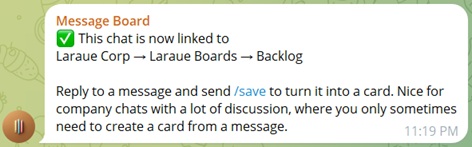
See Linking a Telegram chat to Boards for every step.
3. Let your teammates create cards
A new member starts with no permissions at all, and linking a chat does not hand everyone in it the right to create cards. Give your teammates permission to create issues in that space. See Permissions management.
4. Save a message
Reply to any message with /save. Add a title after the command if you want to set it yourself:
/save Follow up next sprint
Without a title, the first line of the message becomes the title. Reply to a photo or video album and the whole album becomes one card.
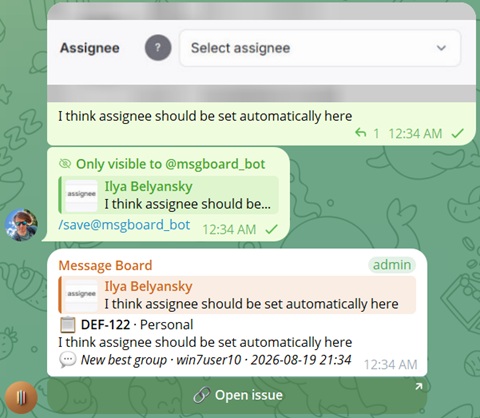
For a rambling message, reply with /aisave instead. It rewrites the text into a clean title and a bullet-point description. It runs on tokens, and every user gets a free allowance each month.
Day to day
- Get a card's link. Reply to a saved message with
/infoto see the card and an Open issue button. - Update a card after an edit. Run
/saveagain on the message and the card is re-synced. - Find a card from any chat. Type
@msgboard_botand your query. See Searching issues from any Telegram chat. - Remove a card. Reply with
/delete, if you have the delete permission for it.
When to save everything automatically
Auto mode turns every message in the chat into a card, and keeps the card in sync when the message is edited. Use it for a small chat that exists only for requests, not for a busy group. To change the mode, unlink the chat with /unlink and link it again. See Auto vs. manual save mode.
Start now
Open Laraue Boards, create your organization, then add @msgboard_bot to your group and send /link.