
Save links and ideas from Telegram — and find them later
Updated October 1, 2026
Telegram is where you read interesting links, get ideas and receive requests — and Saved Messages is where they disappear: easy to save, hard to find. This guide turns what you forward into a board you can search and sort, so a link saved today is still easy to find in three months.
How it works
Forward any message to @msgboard_bot. It becomes an issue in your personal organization, in the Backlog of the Default Space, and the bot confirms it with a reaction. Text, links, photos, videos and albums all work.
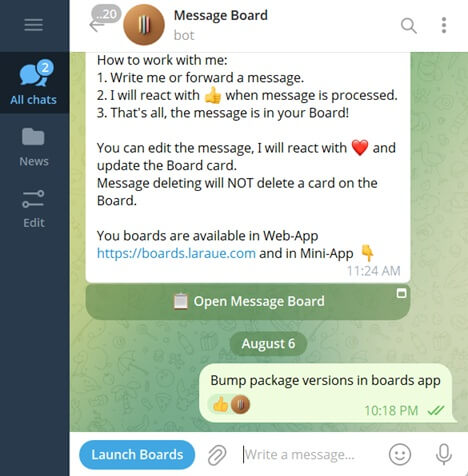
The card keeps the text (up to 4,096 characters), the media, the sender's name and when the message was sent. Your personal organization is private: nobody else sees it, and there is nothing to set up.
Make it a habit
- Open the chat with the bot once and pin it, so it stays at the top of your chat list.
- When you see something worth keeping, long-press the message, tap Forward and choose the bot.
- Want a specific board instead of the Backlog? Send
/linkin your private chat with the bot and choose a board, then pick Every message. From then on, anything you send straight to the bot lands there. See Linking a Telegram chat to Boards.
Sort it when you have time
Everything starts in the Backlog, so saving stays instant and sorting can wait. When you are ready, open an issue and move it to another board or status. Create a board per area — reading list, project ideas, one per client — and group boards into spaces when you have several. Cards in a Done column stay out of the way but remain searchable. See The Backlog.
Find anything later
- In the app. Every board and the Backlog have a search box, and All issues searches across the whole organization.
- From any chat. Type
@msgboard_botand a word from the link or note, and the results appear without leaving the conversation. See Searching issues from any Telegram chat.
Clean up a rambling note
If your private chat is linked in manual mode, reply to a long, messy note with /aisave. It rewrites the text into a clean title and a bullet-point description. It runs on tokens, and every user gets a free allowance each month. See Auto vs. manual save mode.
Why not just Saved Messages?
Saved Messages is a single stream, and Laraue Boards adds structure to it:
- Columns and statuses — an idea can move from "to look at" to "done".
- Boards and spaces — one place per project, client or topic.
- Search — in the app and from any chat.
Start now
Open @msgboard_bot in Telegram and forward your first message. To see the board, open Laraue Boards.